Wednesday, February 6, 2019

Different Types of Printers

One of the important output devices is the printer. Generally printers are divided into two categories. They are :
  1. Impact Printers.
  2. Non-Impact Printers.
An impact printer creates an image by passing an inked ribbon against the paper, using pins or hammers to shape the image. A simple example of an impact printer is a type writer which uses a small hammers to strike the ribbon. An Non impact printers use other means to create an image.

Example:- It use tiny nozzles to spray the droplets of ink onto the page. Laser printers work like photo copies, using heat to bond microscope particles of dry toner to specific parts of the page.

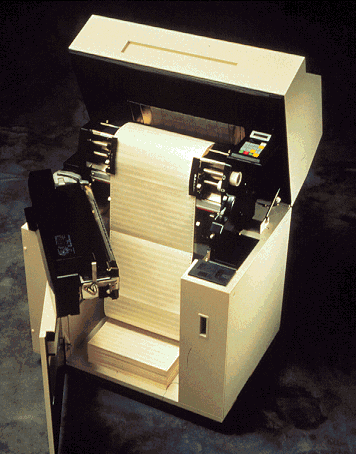
Impact printers
  1. Dot Matrix printers
  2. Line printers
  3. Band printers
  4. Daisy wheel printers
1. Dot Matrix Printers


➧ Dot matrix printers are impact printers and are commonly used in work places where physical impact with the paper is important.
➧ These printers can be produced sheets of plain text very quickly. They are also used to print  wide sheets.

➧ A dot matrix printers creates an image by using a mechanism called print head, which contains a cluster of short pins arranged  in one or more columns.
➧The lowest resolution dot matrix printers have only nine pins, the highest resolution printer have twenty four pins.
➧ Dot matrix printers are not commonly used in home, they are still widely used in business.

2. Line printers

➧ This is a special type of impact printer works like a dot matrix printer but uses a special wide print head that can print an entire line of text at one time.

➧ Line printers are not high resolutions but are incredibly fast.
➧ The faster can print 3000 lines of text per minute.

3. Band printers

➧ A band printer options can be rotating band that's raised with alpha numeric characters.

➧ To print a character, the machine rotates the band to the desired character, then after small hammer taps the band pressing the character, against a ribbon .
➧  Band printers are very fast and very robust.

4. Daisy Wheel Printers

➧  This printer is used a spinning wheel with characters embossed around its edge .
➧  A hammer strikes the wheel from behind pressing a character against a ribbon.

➧  Daisy wheel printers can be created as clean text but it cannot print the graphics.
➧  They are also very slow in comparison with other printers.

Non-Impact printers
  1. Inkjet Printers
  2. Laser Printers
1. Inkjet Printers

➧  We can create an image directly on the paper by spraying ink through tiny nozzles.
➧  Now a days these models can print from two to four pages per minute.
➧  When compared to laser printers, the operating cost of an inkjet printer is low.
➧  Expensive maintenance is rare, and the only part that needs routine replacement is the ink cartridge.

➧  Many inkjet printers are using one cartridge for color printing and a separate black-only cartridge for black and white printing.
➧  This feature saves the money by reserving colored ink only used  for color printing.
➧  Inkjet printers offer a cost effective way to print in color.
➧  Color inkjet printers have four ink nozzles, blue, red, yellow, and black.
➧  These four colors are in almost all color printing because it is possible to combine them to create any color.
➧  Notice that the colors are different form the primary additive colors are different form the primary additive colors (red, green, blue) used in monitors.

2. Laser Printers

➧  Laser printers are more expensive than inkjet printers, their print quality is higher, and most re faster.
➧  A separate CPU and memory are built into the printer to interpret the result is it receives from the computer and to control the laser.
➧ The result is a completed piece of equipment that uses technology similar to that in photo-copies.
➧  The quality and speed of the laser printers make them idle for office environments where several users can easily share the same printers via LAN.

➧  The laser in laser printers can aim at any point on a drum, creating an electrical charge.
➧  Toner,which is composed of tiny particles of oppositely charged ink, sticks to the drum in the places the laser has charged.
➧ The colors used are the same as in the color inkjet printer Cyan, Magenta, yellow and black.
➧ Single color model laser printers can produce between four and sixteen pages of text a minute.
➧  The resolution for laser printers is 300 or 600.
➧  Convenience is another advantage of laser printers.
➧  The disadvantage of laser printers are the price and the cost of operation.

    Friday, February 1, 2019

    MS-Excel Short Cut Keys

    MS-Excel Short Cut Keys


    ➧ F1                                    =      Help option.
    ➧ F2                                   =       Edit option of the selected cell.
    ➧ F5                                   =       Spell checking or grammar checking of the text or document.
    ➧ F11                                  =      Create a chart.
    ➧ Ctrl + 1                         =       Format cell. 
    ➧ Ctrl + 2                        =       Bold
    ➧ Ctrl + 3                        =       Italic
    ➧ Ctrl + 4                        =       Under Line
    ➧ Ctrl + 5                        =       Strike Off the test.
    ➧ Ctrl + 8                        =       Create an Outline.
    ➧ Ctrl + 9                        =       Hidden the test of a columns in a sheet.
    ➧ Ctrl + 0                        =       Hidden the test in a cell.
    ➧ Ctrl + Shift + 9         =       Unhide the test of the column.
    ➧ Ctrl + F1                      =       Minimize the ribbon.
    ➧ Ctrl + F2                      =      Print Preivew.
    ➧ Ctrl + F3                      =      Name Manager.
    ➧ Ctrl + F4                      =      Close the book sheet.
    ➧ Ctrl + F6                      =      Switch between open sheets.
    ➧ Ctrl + F9                      =      Minimize the current window.
    ➧ Ctrl + F10                    =      Maximize the current window.
    ➧ Ctrl + F11                     =      Open the macro.
    ➧ Ctrl + F12                    =      Open the excel sheet.
    ➧ Ctrl + A                        =      Select all data in the sheet.
    ➧ Ctrl + B                        =      Bold the selected data.
    ➧ Ctrl + C                        =      Copy 
    ➧ Ctrl + D                        =     Move up to down the text without copy the text.
    ➧ Ctrl + F                         =     Find What.
    ➧ Ctrl + G                        =     Goto specific cell in the sheet.
    ➧ Ctrl + H                        =     Replace the data.
    ➧ Ctrl +  I                         =     Italic 
    ➧ Ctrl + K                        =     Hyperlink
    ➧ Ctrl + L                         =     Create Table.
    ➧ Ctrl + N                        =     Open the new work sheet.
    ➧ Ctrl + O                        =     Open the existed work sheet.
    ➧ Ctrl + P                        =      Print the sheet.
    ➧ Ctrl + S                         =     Save the sheet.
    ➧ Ctrl + T                         =     Create the table.
    ➧ Ctrl + U                        =     Under Line the test.
    ➧ Ctrl + V                        =     Paste.
    ➧ Ctrl + W                       =     Close the document.
    ➧ Ctrl + X                        =     Cut the test.
    ➧ Ctrl + Z                         =     Redo.
    ➧ Ctrl + Space               =      Select entire column.
    ➧ Shift + Space             =      Select entire row.
    ➧ Shift + F3                   =     Open the excel formula wimdow.
    ➧ Shift + F3                   =     Bring up the search box.
    ➧ Ctrl + Tab Button    =     Move between two or more excel sheets.
    ➧ Ctrl + '                           =     Insert the values into the currently selected cell.
    ➧ Ctrl + Page up           =     Move between excel work sheets in the same excel document.
    ➧ Ctrl + Page Down    =     Move between excel work sheets in the same excel document.
    ➧ Ctrl + ➡️                        =     Move to the cursor last section of a text.
    ➧ Ctrl + ⬅️                        =     Move to the cursor first section of a text.
    ➧ Ctrl + ⬇️                          =     Move to the cursor last section of a text.
    ➧ Ctrl + ⬆️                          =     Move to the cursor first section of a text.
    ➧ Ctrl + Shift + !           =      Format number in comma format.
    ➧ Ctrl + Shift + $          =      Format number in currency format.
    ➧ Ctrl + Shift + @         =      Format number in number format.
    ➧ Ctrl + Shift + #          =      Format number in Date format.
    ➧ Ctrl + Shift + %          =      Format number in percentage format.
    ➧ Ctrl + Shift + ^           =      Format number in scientific format.
    ➧ Ctrl + Shift + ;            =      Enter the current time.
    ➧ Ctrl + ;                           =      Enter the current date.
    ➧ Alt   + =                         =      Crete a formula to sum of the above cell.

    Saturday, January 26, 2019

    Different Type Of Output Devices

    Type Of Output Devices


    The output is the data which is processed and returned to the user or to another computer system. The function of an output device is present processed data to the user. The Common output devices are the display screen called monitor and the printer.

    The computer sends the output to monitor when the user needs only to see the output. It sends the output to the printer, Whenever the user needs a paper copy called "Hard Copy". 

    A Computer accepts the sounds as input, they can use also speakers or headphones as output devices to produce the sounds. They can be classified into the 5 types. They are:
    1. Monitors
    2. Speakers
    3. Printers
    4. Plotters
    5. Snapshot Plotters
    ➤ Monitors 

    The monitor is the most commonly used the output device on most personal computer systems. Basically two types of monitors are used with PC's . The first is the typical monitor that you see on a desktop computer, Which looks like a television screen and works the same way. This type of monitors uses a large vacuum tube called a Cathode Ray tube (CRT).
    CRT-Monitor.jpeg

    The second type is known as a flat-panel display is used primarily with portable computers, but it is becoming an increasingly popular feature with desktop computers. monitors are usually monochrome, gray scale, and color monitors. When we purchasing a monitor then you should consider its size, resolution, refresh rate, and dot pitch.

    ➽The quality of the images that a monitor can display is defined as much by the video controller s by the  monitor itself. 
    ➽The video controller is an intermediary devices between the CPU and the monitor. 
    ➽It contain the video dedicated memory and other circuitry necessary to  send information to the screen.
    ➽It consist of circuit board, usually referred to simply as a card, which is attached to the computers mother board.

    ➤ Speakers 
    The most complicated part of the sound output system is in the sound card. The sound card translates digital sound into the electronic current that is sent to the speakers.
    Speakers.jpeg

     A combination of speakers for notebook computers that area unit steam-powered and audio-connected to the pc via USB pc speakers, or transmission speakers, area unit speakers oversubscribed to be used with computers, though typically capable of different audio uses,  for example AN MP3 player. Mostly such speakers have an enclose delectronic equipment and consequently need an influence supply, which can be by a mains power offer typically via an AC adapter, batteries, or a USB port.

    Computer speakers are vary wide in quality and in value. pc speakers generally prepackaged with pc systems area unit tiny, plastic, and have mediocre sound quality. Some pc speakers have feat options like bass and treble controls.


    ➤ Printers 
    The other most important output device is the printer. Generally printers fall into two categories. They are 
    1. Impact 
    2. Non impact.
    ➽An Impact printer creates an image by pressing an inked ribbon against the paper, using pins and / or hammers to shape the image. A simple example of an impact printer is a typewriter which uses small hammers to strike the ribbon. Each hammer is printed with the shape of an alphanumeric character.  
                               Impact-vs-Non-Impact-Printers.jpeg
    ➽Non impact printers use other means to create an image, inkjet printer, for example, use tinny nozzles to spray droplets of ink on to the page. Laser printer works photo copies. It is using to heat to bond microscopic particles of dry toner to specific parts of the page.

    ➤ Plotters 
    A plotter is a special kind of output device. It is just like that a printer, because it produces the images on papers, but the plotter is used to print large format images, such as construction or engineering drawings created in CAD (Computer Aided Design) system.                                   
    Plotter .jpeg
    ➤ Snapshot Plotters 
    snapshot printers are specialized, small format printers used to print small color photographs. Snapshot printers popular among users who own digital cameras. 
                                        Snapshot-Plotters.jpeg
    Snapshot printers are fairly slow, and they can be more expensive to operate than standard inkjet or laser printers.