Monday, February 11, 2019

MS-PowerPoint Short Cut Keys

MICROSOFT POWER POINT SHORT CUT KEYS


  •  Ctrl + A                 :    Select all items on the page or the active text box
  •  Ctrl + C                   Copy
  •  Ctrl + P                 :    Opens the print dialog box
  •  Ctrl + S                 :    Save
  •  Ctrl + V                 :    Paste
  •  Ctrl + X                 :    Cut
  •  Ctrl + Z                 :    Undo last change
  •  F5                           :    View the slide show
  •  S                             :    stop the show. Press S again to restart the show
  •  Esc                         :    End the slide show
  •  Ctrl + A                 :    select all items on the page or the active text box
  •  Ctrl + B                 :    Applies bold to the selected text
  •  Ctrl + D                   Duplicates the selected object
  •  Ctrl + F                    Opens and find dialog box
  •  Ctrl + G                 :    Opens the grids and guides dialog box
  •  Ctrl + H                 :    Opens the replace dialog box
  •  Ctrl + I                   :    Applies italics to the selected text
  •  Ctrl + M                 :    Inserts a new slide
  •  Ctrl + N                 :    Opens a new blank presentation
  •  Ctrl + O                 :    Opens the open dialog box
  •  Ctrl + T                  :    Opens the font dialog box
  •  Ctrl + U                  :    Applies underlining to the selected text
  •  Ctrl + V                  :    Paste
  •  Ctrl + W                 :    Close the presentation
  •  Ctrl + Y                  :    Repeats the last command entered
  •  Home                     :   Moves cursor to beginning of current line to text
  •  End                         :    Moves cursor to end of current line of  text
  •  Ctrl + Home         :    Moves cursor to beginning of  presentation
  •  Ctrl + End             :    Moves cursor to end of presentation
  •  Page up                  :    Moves to previous slide
  •  Page down            :    Moves to next slide
  •  Ctrl + Left arrow         :   Moves cursor to beginning of  previous word
  •  Ctrl + Right arrow      :   Moves cursor to beginning of next word
  •  Ctrl + Up arrow           :   Moves cursor to start of previous paragraph
  •  Ctrl + Down arrow     :    Moves cursor to start of next paragraph
  •  Shift + Left arrow       :    Selects the previous letter
  •  Shift + Right arrow    :    Selects the next letter
  •  Shift + Home               :    Selects text from the cursor to start of the current line
  •  Shift + End                   :    Selects text from the cursor to end of the current line
  •  Shift + F1                      :    Help
  •  F7                                   :    Spellcheck
  •  F12                                 :    Opens save as dialog box
  •  Shift + Ctrl + Home   :    Selects all text from the cursor to the  start of the active text box
  • ➤ Shift + Ctrl + End       :    Selects all text from the cursor to the end of the active text box
  •   
  • ➤ Space bar or Click the mouse  :    Move to next slide or next  animation

Wednesday, February 6, 2019

Different Types of Printers

One of the important output devices is the printer. Generally printers are divided into two categories. They are :
  1. Impact Printers.
  2. Non-Impact Printers.
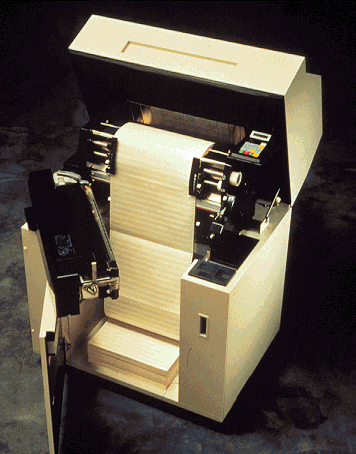
An impact printer creates an image by passing an inked ribbon against the paper, using pins or hammers to shape the image. A simple example of an impact printer is a type writer which uses a small hammers to strike the ribbon. An Non impact printers use other means to create an image.

Example:- It use tiny nozzles to spray the droplets of ink onto the page. Laser printers work like photo copies, using heat to bond microscope particles of dry toner to specific parts of the page.

Impact printers
  1. Dot Matrix printers
  2. Line printers
  3. Band printers
  4. Daisy wheel printers
1. Dot Matrix Printers


➧ Dot matrix printers are impact printers and are commonly used in work places where physical impact with the paper is important.
➧ These printers can be produced sheets of plain text very quickly. They are also used to print  wide sheets.

➧ A dot matrix printers creates an image by using a mechanism called print head, which contains a cluster of short pins arranged  in one or more columns.
The lowest resolution dot matrix printers have only nine pins, the highest resolution printer have twenty four pins.
➧ Dot matrix printers are not commonly used in home, they are still widely used in business.

2. Line printers

 This is a special type of impact printer works like a dot matrix printer but uses a special wide print head that can print an entire line of text at one time.

 Line printers are not high resolutions but are incredibly fast.
➧ The faster can print 3000 lines of text per minute.

3. Band printers

➧ A band printer options can be rotating band that's raised with alpha numeric characters.

 To print a character, the machine rotates the band to the desired character, then after small hammer taps the band pressing the character, against a ribbon .
  Band printers are very fast and very robust.

4. Daisy Wheel Printers

  This printer is used a spinning wheel with characters embossed around its edge .
  A hammer strikes the wheel from behind pressing a character against a ribbon.

  Daisy wheel printers can be created as clean text but it cannot print the graphics.
  They are also very slow in comparison with other printers.

Non-Impact printers
  1. Inkjet Printers
  2. Laser Printers
1. Inkjet Printers

  We can create an image directly on the paper by spraying ink through tiny nozzles.
  Now a days these models can print from two to four pages per minute.
  When compared to laser printers, the operating cost of an inkjet printer is low.
  Expensive maintenance is rare, and the only part that needs routine replacement is the ink cartridge.

  Many inkjet printers are using one cartridge for color printing and a separate black-only cartridge for black and white printing.
  This feature saves the money by reserving colored ink only used  for color printing.
  Inkjet printers offer a cost effective way to print in color.
  Color inkjet printers have four ink nozzles, blue, red, yellow, and black.
  These four colors are in almost all color printing because it is possible to combine them to create any color.
  Notice that the colors are different form the primary additive colors are different form the primary additive colors (red, green, blue) used in monitors.

2. Laser Printers

  Laser printers are more expensive than inkjet printers, their print quality is higher, and most re faster.
  A separate CPU and memory are built into the printer to interpret the result is it receives from the computer and to control the laser.
 The result is a completed piece of equipment that uses technology similar to that in photo-copies.
  The quality and speed of the laser printers make them idle for office environments where several users can easily share the same printers via LAN.

  The laser in laser printers can aim at any point on a drum, creating an electrical charge.
  Toner,which is composed of tiny particles of oppositely charged ink, sticks to the drum in the places the laser has charged.
 The colors used are the same as in the color inkjet printer Cyan, Magenta, yellow and black.
 Single color model laser printers can produce between four and sixteen pages of text a minute.
  The resolution for laser printers is 300 or 600.
  Convenience is another advantage of laser printers.
  The disadvantage of laser printers are the price and the cost of operation.
    Friday, February 1, 2019

    MS-Excel Short Cut Keys

    MS-Excel Short Cut Keys


    F1                                    =      Help option.
    F2                                   =       Edit option of the selected cell.
    F5                                   =       Spell checking or grammar checking of the text or document.
    F11                                  =      Create a chart.
    Ctrl + 1                         =       Format cell. 
    Ctrl + 2                        =       Bold
    Ctrl + 3                        =       Italic
    Ctrl + 4                        =       Under Line
    Ctrl + 5                        =       Strike Off the test.
    Ctrl + 8                        =       Create an Outline.
    Ctrl + 9                        =       Hidden the test of a columns in a sheet.
    ➧ Ctrl + 0                        =       Hidden the test in a cell.
     Ctrl + Shift + 9         =       Unhide the test of the column.
    ➧ Ctrl + F1                      =       Minimize the ribbon.
    ➧ Ctrl + F2                      =      Print Preivew.
    ➧ Ctrl + F3                      =      Name Manager.
    ➧ Ctrl + F4                      =      Close the book sheet.
    ➧ Ctrl + F6                      =      Switch between open sheets.
    ➧ Ctrl + F9                      =      Minimize the current window.
    ➧ Ctrl + F10                    =      Maximize the current window.
    ➧ Ctrl + F11                     =      Open the macro.
    ➧ Ctrl + F12                    =      Open the excel sheet.
    ➧ Ctrl + A                        =      Select all data in the sheet.
    ➧ Ctrl + B                        =      Bold the selected data.
    ➧ Ctrl + C                        =      Copy 
    ➧ Ctrl + D                        =     Move up to down the text without copy the text.
    ➧ Ctrl + F                         =     Find What.
    ➧ Ctrl + G                        =     Goto specific cell in the sheet.
    ➧ Ctrl + H                        =     Replace the data.
    ➧ Ctrl +  I                         =     Italic 
    ➧ Ctrl + K                        =     Hyperlink
    ➧ Ctrl + L                         =     Create Table.
    ➧ Ctrl + N                        =     Open the new work sheet.
    ➧ Ctrl + O                        =     Open the existed work sheet.
    ➧ Ctrl + P                        =      Print the sheet.
    ➧ Ctrl + S                         =     Save the sheet.
    ➧ Ctrl + T                         =     Create the table.
    ➧ Ctrl + U                        =     Under Line the test.
    ➧ Ctrl + V                        =     Paste.
    ➧ Ctrl + W                       =     Close the document.
    ➧ Ctrl + X                        =     Cut the test.
    ➧ Ctrl + Z                         =     Redo.
    ➧ Ctrl + Space               =      Select entire column.
    Shift + Space             =      Select entire row.
    ➧ Shift + F3                   =     Open the excel formula wimdow.
    ➧ Shift + F3                   =     Bring up the search box.
    ➧ Ctrl + Tab Button    =     Move between two or more excel sheets.
    ➧ Ctrl + '                           =     Insert the values into the currently selected cell.
    ➧ Ctrl + Page up           =     Move between excel work sheets in the same excel document.
    ➧ Ctrl + Page Down    =     Move between excel work sheets in the same excel document.
    ➧ Ctrl + ➡️                        =     Move to the cursor last section of a text.
    ➧ Ctrl + ⬅️                        =     Move to the cursor first section of a text.
    ➧ Ctrl + ⬇️                          =     Move to the cursor last section of a text.
    ➧ Ctrl + ⬆️                          =     Move to the cursor first section of a text.
    ➧ Ctrl + Shift + !           =      Format number in comma format.
    ➧ Ctrl + Shift + $          =      Format number in currency format.
    ➧ Ctrl + Shift + @         =      Format number in number format.
    ➧ Ctrl + Shift + #          =      Format number in Date format.
    ➧ Ctrl + Shift + %          =      Format number in percentage format.
    ➧ Ctrl + Shift + ^           =      Format number in scientific format.
    ➧ Ctrl + Shift + ;            =      Enter the current time.
    ➧ Ctrl + ;                           =      Enter the current date.
    Alt   + =                         =      Crete a formula to sum of the above cell.